
labrador: Evaluating a Multimodal Retriever - Part 2
This continues my previous post, which covered what labrador is and how it’s built: a local multimodal search over a Mac folder using EmbeddingGemma 2, with dense vectors, BM25 keywords and Reciprocal Rank Fusion.
This part is about measuring it. A search tool that “feels good” on a few queries can still be wrong in systematic ways you’ll never notice by poking at it. Mine was. The first full evaluation found that one component, the keyword branch, was responsible for most of the errors, and fixing it lifted MRR from 0.78 to 0.95.
Why build a benchmark
Public retrieval benchmarks exist, but none of them look like a personal folder. ViDoRe is PDF pages, Flickr30k is photo captions, TextVQA is text in photos. Each stresses one slice. My folder has all of those at once, plus Hindi recipes, stand-up notes and a SQL file, and the hard part of search is ranking across those kinds.
So I built a fictional one: labrador-bench, a 120-file folder for an invented person, with 114 labelled queries. Every name, company, address and number in it is made up, so it can live in the repo.
What’s in the folder
Notes, recipes, travel journals, code, Word documents, an HTML article, a CSV of expenses, photos (drawn scenes, receipts, a boarding pass, a whiteboard), screenshots (Grafana, a terminal, a chat app, a calendar), charts, diagrams, and PDFs: a lease, an annual report, a 40-page employee handbook, a paper, an espresso machine manual, six invoices, and three image-only scans. Thirty stand-up logs sit in there as bulk distractors that answer nothing.
What the queries test
| Category | Queries | What it tests |
|---|---|---|
| text-semantic | 37 | Paraphrased questions over notes, HTML and text; few shared words |
| text-exact | 9 | IDs, codes and confirmation numbers, some only visible inside images |
| multilingual | 5 | English queries for Hindi, Tamil, Spanish and French files |
| code | 5 | Describe what code does |
| image-ocr | 12 | Answer is text inside a screenshot, receipt photo or whiteboard |
| image-visual | 17 | Answer is what a picture shows: charts, diagrams, scenes, dashboards |
| docx-text / docx-image | 5 | Text and pictures in Word files |
| pdf-text-page | 11 | The right page of a text PDF |
| pdf-visual-page | 3 | A page whose content is a vector chart or diagram |
| pdf-embedded-image | 4 | A photo or figure inside a PDF |
| scanned | 3 | Image-only PDFs |
| needle | 3 | One page in a 40-page PDF |
23 queries are marked hard: the answer has a deliberately similar distractor in the folder. There are two postmortems, two Kubernetes notes, a lease and a scanned lease addendum, and a latency spike described in words in one file and drawn as a chart in another.
Each query is one JSON line:
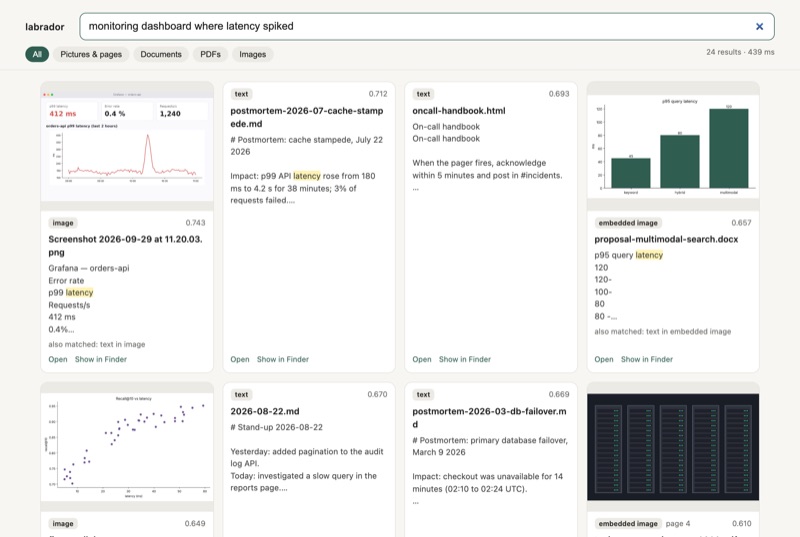
{"query": "monitoring dashboard where latency spiked", "category": "image-visual",
 "expect": "screenshots/Screenshot 2026-09-29 at 11.20.03.png", "hard": true,
 "note": "distractor: cache stampede postmortem describes a latency spike in words"}
Metrics
labrador eval queries.jsonl reports three numbers, overall, per category and for the hard subset:
- hit@1: is the expected file (and page, when given) the top result?
- hit@5: is it in the top five?
- MRR@10: mean of
1/rank, 0 if it’s not in the top 10. It rewards rank 1 most and still gives partial credit for rank 2 or 3.
114 queries is small, so every comparison below comes with a 95% paired-bootstrap confidence interval, and I counted how many queries got better or worse. A difference whose interval includes zero is treated as noise.
The baseline
Real model (768 dims, float32 on MPS, Apple Vision OCR), default settings, on an M1 Pro:
| hit@1 | hit@5 | MRR@10 | |
|---|---|---|---|
| baseline | 0.72 | 0.84 | 0.783 [0.712, 0.849] |
That looks respectable until you break it down by category:
| category | n | MRR |
|---|---|---|
| multilingual | 5 | 0.050 |
| image-visual | 17 | 0.456 |
| pdf-visual-page | 3 | 0.667 |
| pdf-embedded-image | 4 | 0.750 |
| image-ocr | 12 | 0.842 |
| text-exact | 9 | 0.852 |
| text-semantic | 37 | 0.878 |
| pdf-text-page | 11 | 0.909 |
| code, docx, scanned, needle | 16 | 1.000 |
Multilingual search, which I’d bragged about in part 1, was basically broken: 4 of 5 queries didn’t make the top 10. Pictures were found less than half the time.
Finding the culprit
I wrote an evaluation harness that re-implements search() step by step, checked it matched the real function on all 114 queries (0 mismatches), and then ran 19 variants: dense only, keywords only, no z-scoring, different RRF constants, different dimensions, with and without each unit type.
The single most useful number came from looking at the misses. Of the 32 queries where the right answer wasn’t at rank 1, 24 already had it at rank 1 by raw cosine. The embedding model was getting them right. Something after it was pushing them down.
That something was the keyword branch:
| variant | hit@1 | hit@5 | MRR |
|---|---|---|---|
| baseline (dense + keywords) | 0.72 | 0.84 | 0.783 |
| dense only | 0.86 | 0.98 | 0.914 |
| keywords only | 0.61 | 0.76 | 0.677 |
Turning the keywords off improved MRR by 0.13. Dense-only had multilingual and image-visual at 1.000.
Why keywords hurt
The keyword search ORed every query word, stop-words included. A natural-language query like “how do pods on different machines reach each other” matched any unit containing “how”, “on” or “each”. The median query matched 121 units, and many hit the cap of 200.
Two things made that toxic:
- The candidates were asymmetric. Image units have no text in the FTS index; they match only by file name. Text units match on any shared word. So every text chunk that happened to contain “the” got a second helping of RRF score, which a photo, a page render or a Tamil note could never get.
- RRF arithmetic. A dense #1 alone scores
1/61 = 0.0164. A text unit at dense #20 that’s also keyword #1 scores1/81 + 0.7/61 = 0.0238. The mediocre text chunk wins.
That’s why the failing categories were exactly the ones whose answers share no words with the query: other languages, pictures and page renders.
Identifiers had their own problem. LD-2026-0417 was tokenised into ld OR 2026 OR 0417, and “2026” matched 161 units.
The fix: AND
I tried the gentle fixes first: removing stop-words, phrase tokens, capping the keyword list, lowering the weight, AND-then-fall-back-to-OR. All of them kept the OR tail and recovered only part of the gap (MRR 0.79–0.88).
What worked was the blunt one: a unit must contain every query word (AND), with the keyword weight raised to 1.0.
# AND, not OR: OR lets common words match nearly every text unit, and that noise outranks
# pictures and other-language files in the fusion. AND fires mostly on short, specific
# queries (IDs, codes, names), which is where keywords beat embeddings.
q = " AND ".join(f'"{w}"' for w in words)
With AND, the keyword branch fires on only 8 of the 114 queries, nearly all the ID-style ones, and those get exact hits. Long questions get no keyword hits at all, so they’re ranked by the embeddings alone. Keywords end up doing the one job embeddings are bad at.
| hit@1 | hit@5 | MRR@10 | hard MRR | |
|---|---|---|---|---|
| baseline (OR, w=0.7) | 0.72 | 0.84 | 0.783 | 0.783 |
| dense only | 0.86 | 0.98 | 0.914 | 0.906 |
| AND, w=1.0 | 0.90 | 1.00 | 0.947 | 0.906 |
- vs baseline: ΔMRR +0.164 [+0.091, +0.240], 27 queries better, 8 worse.
- vs dense only: +0.033 [+0.007, +0.066], 5 better, 0 worse. So keyword search still earns its place; it just has to stay out of the way.
Did I just overfit to 114 queries?
Possibly. I chose the fix after looking at the failures, which is how you overfit. To check, I ran a 290-configuration grid (stop-words, phrase tokens, OR/AND/AND-then-OR, keyword top-N, weight, RRF k), picked the best config on one stratified half of the queries and scored it on the other half, 40 times. Held-out MRR: 0.929 ± 0.025, against 0.783 for the old config on the same halves. AND matching was picked in 37 of the 40 folds.
I also ran it on the 12-query sample set that ships with the repo, which played no part in choosing the fix: MRR went from 0.747 to 1.000.
What the fix cost
It wasn’t free. In 8 text-semantic queries, OR keywords had been lifting the answer from #2 to #1. “How long was checkout down in March” used to find the database failover postmortem first; now it’s second. “Binary search through history to find which change introduced a bug” dropped from #1 to #4 behind other engineering notes.
All 11 remaining non-top-1 queries are near misses within the top 4. Ten are text-semantic, five of them hard negatives: two postmortems, two Kubernetes notes, and espresso notes vs the espresso manual. The model gets the topic right and the specific document wrong. I’ll take that trade.
Ablations: what actually matters
With the fix in place, I removed one piece at a time:
| change | MRR | Δ [95% CI] | reading |
|---|---|---|---|
| no image vectors (text + OCR only) | 0.876 | −0.071 [−0.129, −0.016] | image vectors matter: image-visual 1.00 → 0.55 |
| text units only (no images, no OCR) | 0.646 | −0.300 [−0.392, −0.212] | |
| no OCR units | 0.936 | −0.011 [−0.029, +0.006] | not significant |
| no PDF page images | 0.955 | +0.008 [−0.018, +0.034] | not significant |
| no per-modality z-score | 0.958 | +0.011 [−0.016, +0.039] | not significant |
| dim 512 | 0.954 | +0.008 [−0.013, +0.030] | free |
| dim 256 | 0.944 | −0.002 [−0.018, +0.014] | free, and the index is 3× smaller |
| dim 128 | 0.887 | −0.059 [−0.098, −0.026] | real loss |
Three of these surprised me.
OCR barely matters now. Under the old config, removing OCR looked catastrophic (−0.156). That was the keyword noise again: OCR text was the only way an image could compete in the OR list. Once the noise was gone, the vision encoder turned out to read text in images well on its own. OCR still helps exact codes and scanned pages a little.
Z-scoring shows no measurable benefit. The modality-gap calibration I explained so carefully in part 1 doesn’t move the needle on this benchmark. The modality gap is real, but RRF works on ranks, and that seems to absorb most of it. I’ve kept it in because the folder is small and I expect the gap to matter more in a folder with 10× more text, but the honest result is “not proven”.
256 dimensions cost nothing here. Matryoshka truncation to 256 is within noise; 128 is where it breaks.
Real-world scenarios
Numbers aside, here’s how the fixed version handles the kinds of searches I actually do. All of these are runs against the benchmark folder with the real model; results are as the app returned them.
“How much did I spend at the coffee shop?”
The answer is on a receipt photo, IMG_2041.png. It’s ranked #1, matched both as a picture and through its OCR text (TOTAL $14.75). The expenses CSV with the same merchant is #2. (Screenshot in part 1.)
A dashboard vs a postmortem that describes it
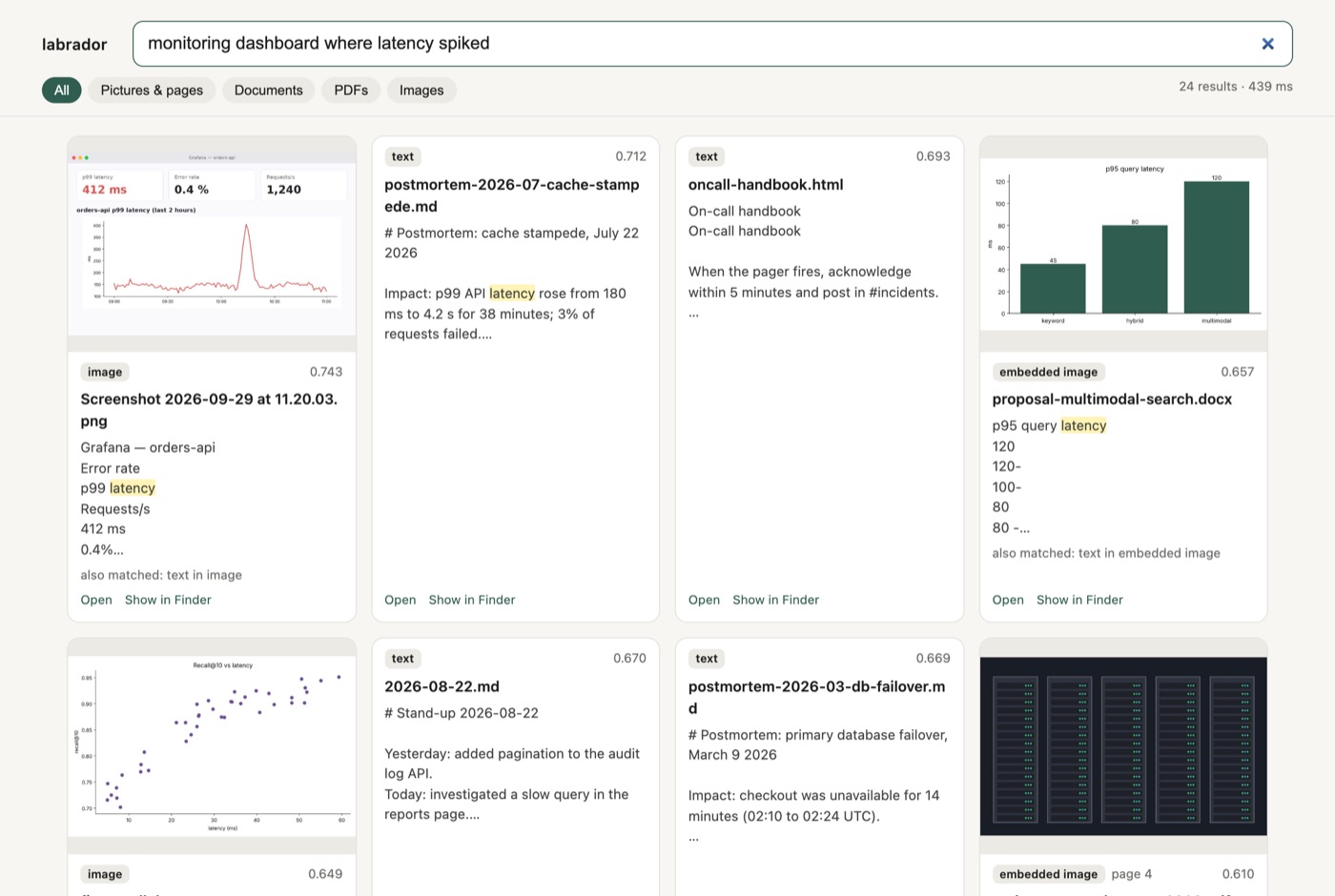
“Monitoring dashboard where latency spiked” is a hard negative. The cache-stampede postmortem talks about a p99 latency spike in words, which is a strong text match. The Grafana screenshot shows one. The screenshot wins (0.743 vs 0.712 raw cosine), and the postmortem is a reasonable #2. Under the old OR config the screenshot was #1 by cosine but came out #2: the postmortem’s shared words (“latency”) gave it the extra keyword score.
A scanned page with no text layer
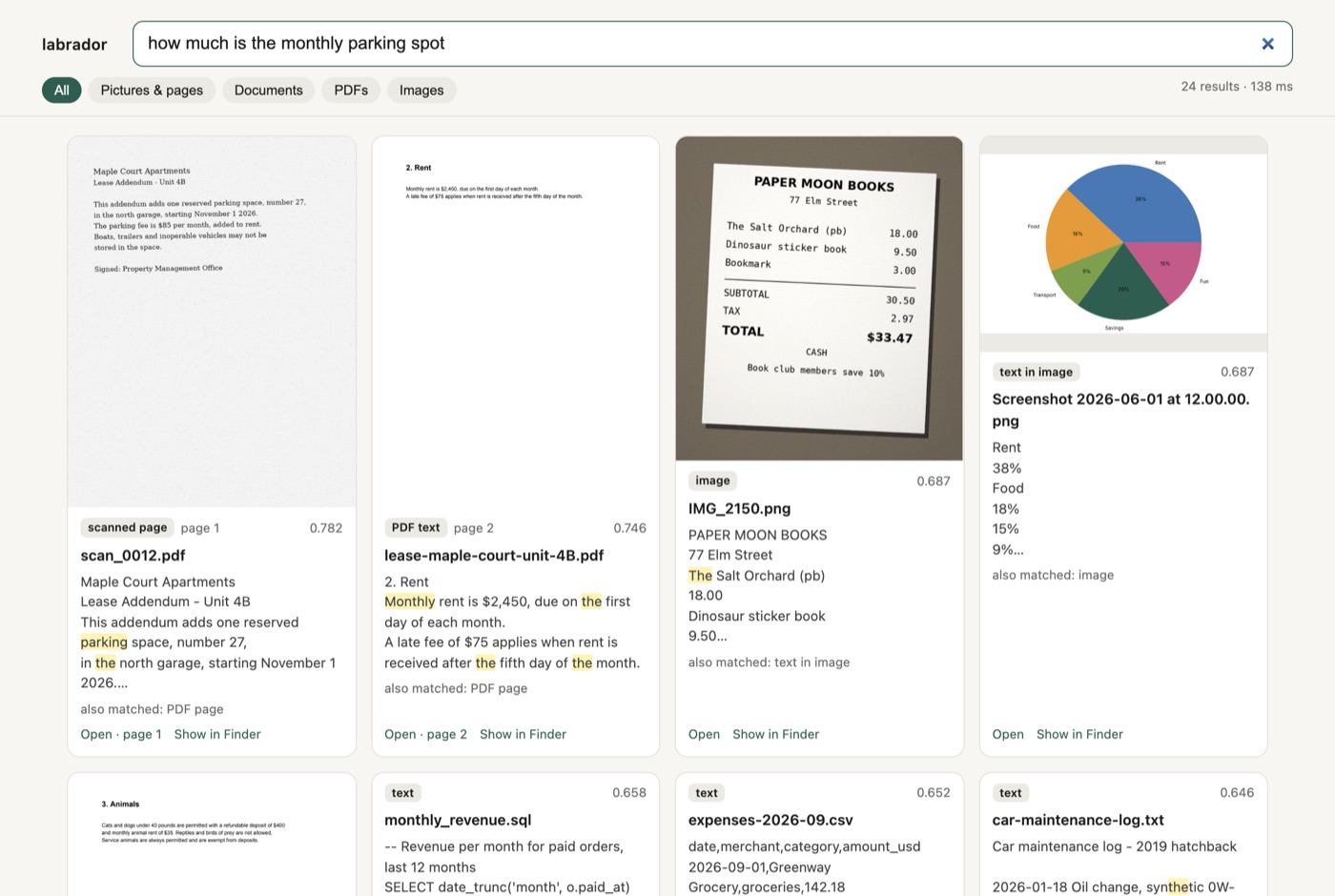
“How much is the monthly parking spot” has to find scan_0012.pdf, an image-only lease addendum, and not the real lease PDF that talks about rent. The OCR’d scan is #1; the lease’s rent clause is #2. Same for “bill for the furnace tune up” and “receipt for tuning the piano”: each finds its own scanned receipt first, with the other scan right behind it.
A needle in a 40-page handbook
| query | result |
|---|---|
| daily meal limit when travelling for work | handbook p.12: “Meals while travelling are reimbursed up to $75 per day” |
| how long is paid leave for new parents | handbook p.22: “16 weeks of fully paid leave” |
| paid time off after five years at the company | handbook p.31: the sabbatical clause |
The last one is my favourite: the query says “paid time off after five years”, and the page says “after five years of service, employees may take a sabbatical”. No shared keyword for the concept, right page. The web UI’s Open button jumps to that page.
English query, non-English file
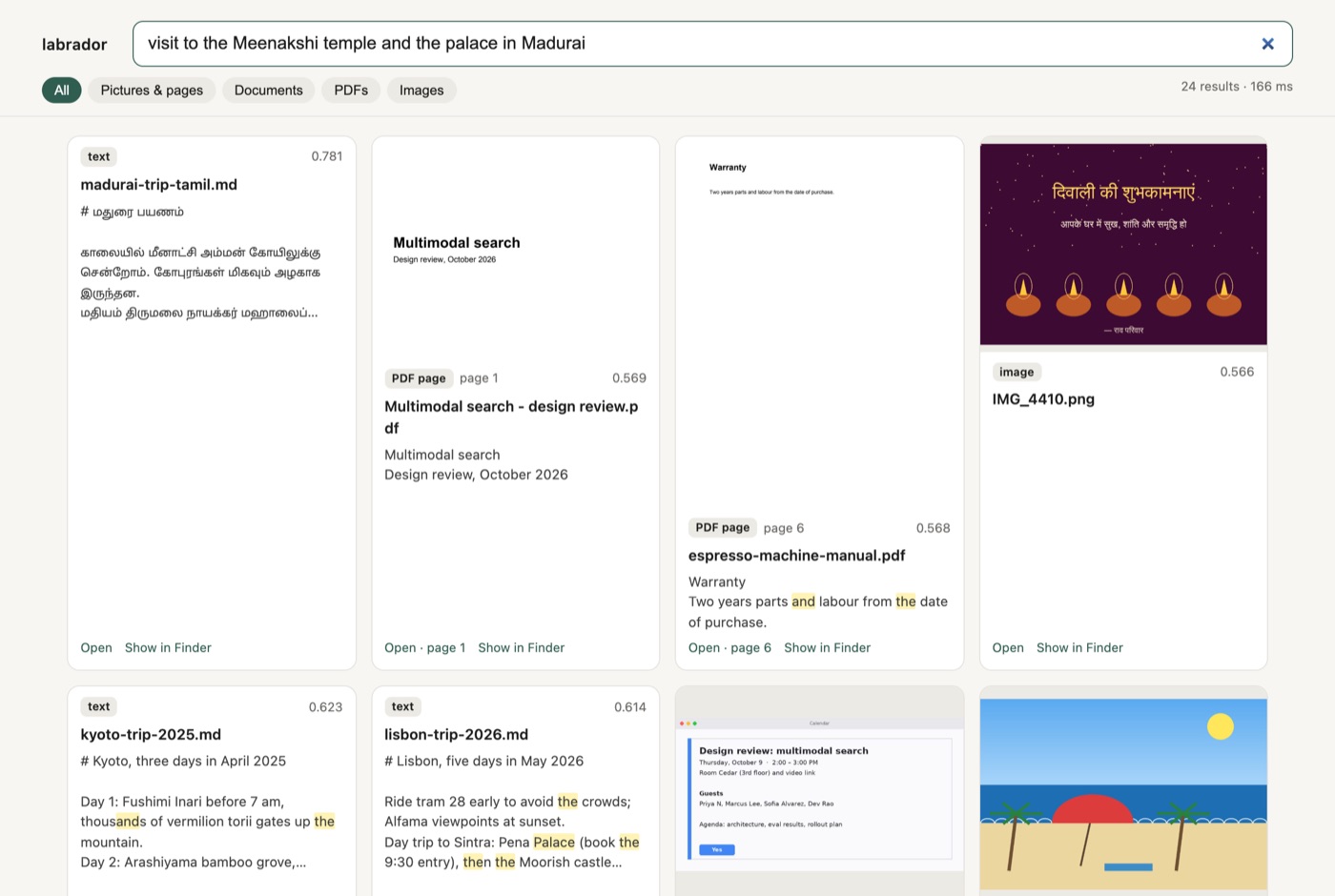
“Visit to the Meenakshi temple and the palace in Madurai” finds a travel note written in Tamil. “Which day will the garbage be collected after the neighborhood meeting” finds Spanish meeting notes (“La recogida de basura pasa al jueves”). This category went from 0.05 to 1.00 MRR with the keyword fix. The embedding model was always capable of it; the fusion was hiding it.
A picture with no readable text
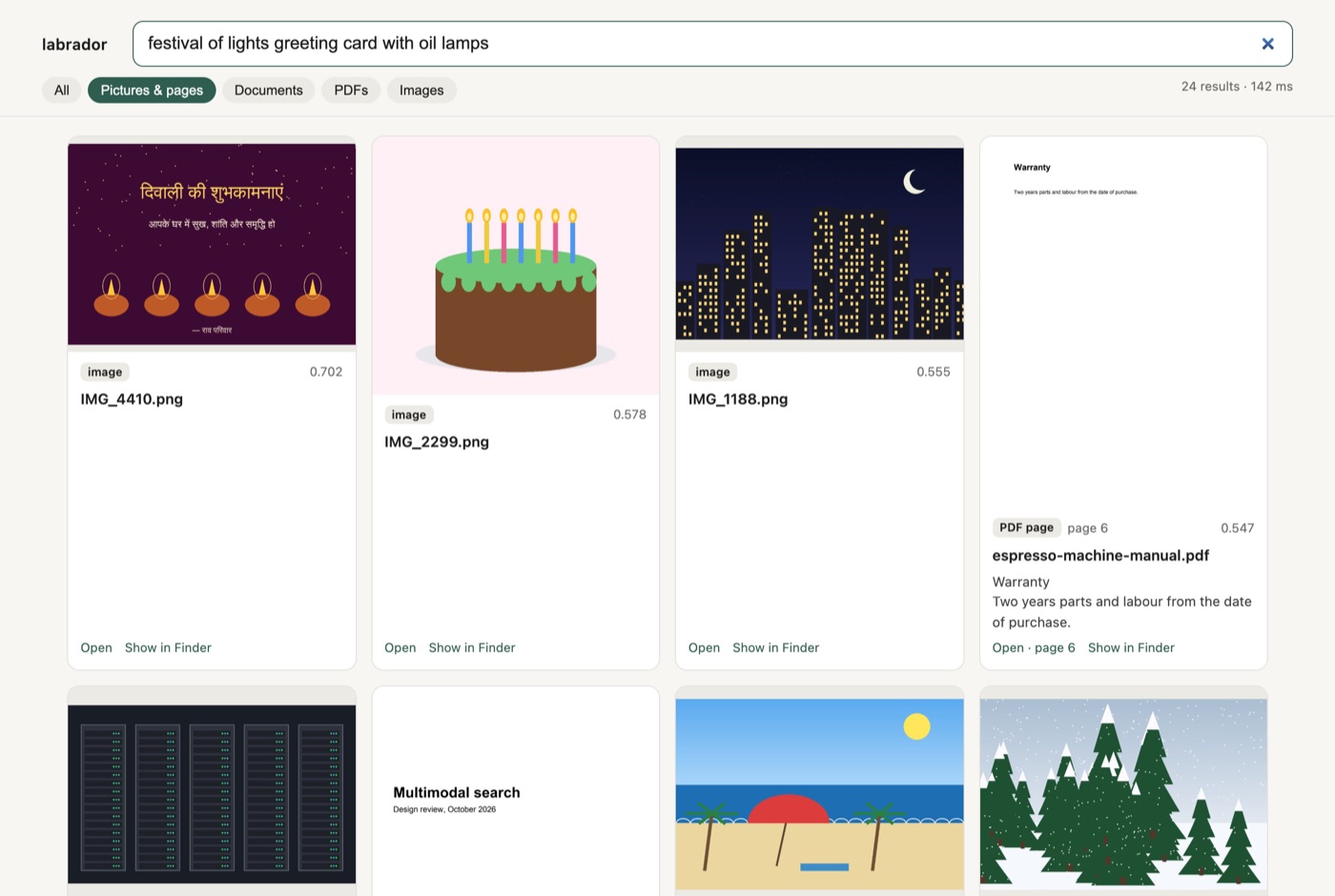
“Festival of lights greeting card with oil lamps” targets a Diwali card whose caption is in Hindi. Apple Vision OCR returned no text for it at all, so this is the image vector alone. It’s #1, well clear of the next picture (0.702 vs 0.578).
Exact codes
| query | where it lives | rank |
|---|---|---|
8f3a21 |
request id visible only in a terminal screenshot | 1 |
58-QX-2210 |
a hotel confirmation number in a travel note | 1 |
K7Q2ZP |
boarding pass photo | 2 |
58-QX-2210 shows the keyword branch doing its job. The Lisbon note’s raw cosine for that query is only 0.553, lower than two unrelated screenshots, but it’s the only unit containing all three tokens, so the exact match carries it to #1.
K7Q2ZP is the one failure worth explaining. OCR read the boarding-pass code as K7QZZP, so the exact-match branch can’t find it. The image vector still puts the boarding pass at #2, behind a terminal screenshot that’s also full of code-like strings. A trigram FTS index (tokenize='trigram') would tolerate this kind of one-character OCR error, and that’s the next thing I want to try.
Pages and figures inside PDFs
| query | result |
|---|---|
| line chart of revenue rising each quarter in the annual report | annual report p.2, a page that is almost only a vector chart |
| photo of server racks with blinking lights | annual report p.4, the embedded photo |
| labelled drawing of the machine with the water tank and steam wand | espresso manual p.2, the parts diagram |
| slide with the pipeline of boxes from files to search | design review deck p.3 |
These only work because PDF pages are also embedded as pictures and embedded images are pulled out as their own units. A text-only indexer would miss all of them.
Other things the eval turned up
Running a real evaluation shakes out more than ranking bugs:
- A missing dependency.
torchvisionwas required by the model’s processor but missing frompyproject.toml, so a freshuv synccouldn’t index anything. It worked on my machine only because something else had installed it. - A mislabelled kind. Pictures embedded in Word files were stored as
pdf_image, so--only pdfreturned them and--only imagedidn’t. - Wrong tuning advice. My README said to raise
keyword_weightfor ID-heavy folders. Under OR matching that did nothing (MRR 0.778 at 1.0, 0.777 at 1.5). It only makes sense with AND. - Performance. Indexing the 120 files (7.8 MB) took 193 s, with 2.0 GB peak memory and a 4.4 MB index. Images go through at about 1.6 per second at 280 tokens; PDF page renders dominate the time. A query takes 35–50 ms, including embedding the query.
Caveats
- 114 queries is small. Categories with five or fewer queries swing by 0.2 MRR per query, so read those as anecdotes. The overall and cross-validated numbers are the reliable ones.
- The photos are drawn, not photographed. Real camera photos are harder. Adding 20–30 of my own photos with one query each is the real test of photo search.
- The folder is tiny. A real folder has far more text units. That would have made the OR noise worse, but it also means AND on short queries like “tax 2024” will match more units than it does here.
- One machine, one model. Everything ran on an M1 Pro with 16 GB.
Takeaways
- Look at where the right answer was before the final ranking. “24 of 32 misses were already #1 by cosine” pointed straight at the fusion step. Aggregate metrics alone wouldn’t have.
- Hybrid search isn’t automatically better than dense. The keyword branch was subtracting 0.13 MRR until it was restricted to the queries where keywords help.
- Ablate after you fix, not before. OCR looked essential and z-scoring looked harmless only because of the bug; once it was fixed, both stories changed.
- Put a confidence interval on it. With 114 queries, half the differences I’d have reported as wins were noise.
The benchmark, the harness and the full report are in the repo: github.com/deepns/labrador. If you build a retriever for your own files, I’d recommend building the fake folder before tuning anything. It took an afternoon and found the biggest bug in the project.



Comments