
labrador: Local Multimodal Search on a Mac - Part 1
I have a folder problem. Somewhere on my laptop there is a receipt photo, a slide with the architecture diagram, a screenshot of an error with a request id in it, and a scanned lease addendum. I know roughly what each one looks like or says, but not what it’s called. Spotlight matches file names and some text. It doesn’t know that IMG_2041.png is a coffee shop receipt.
So I built labrador: a local, private, multimodal search over a folder on a Mac. You describe what you’re looking for in plain words, and it returns the most relevant text passages, text read from images, images, PDF pages and pictures embedded in PDFs. Nothing leaves the machine.
It’s a learning-sized take on DigUp, which does the same thing in Swift. labrador is Python, about 1,275 lines, and every stage of the pipeline is a small module you can read in one sitting. That was the point: I wanted to see each moving part of a multimodal retriever, not hide them behind a framework.
This is part 1: what it does, how it’s built and how to use it. Part 2 covers the evaluation: a 114-query benchmark, the bug it found, and a set of everyday search scenarios tested against the app.
What it finds
Here is a query for something that only exists as a photo:
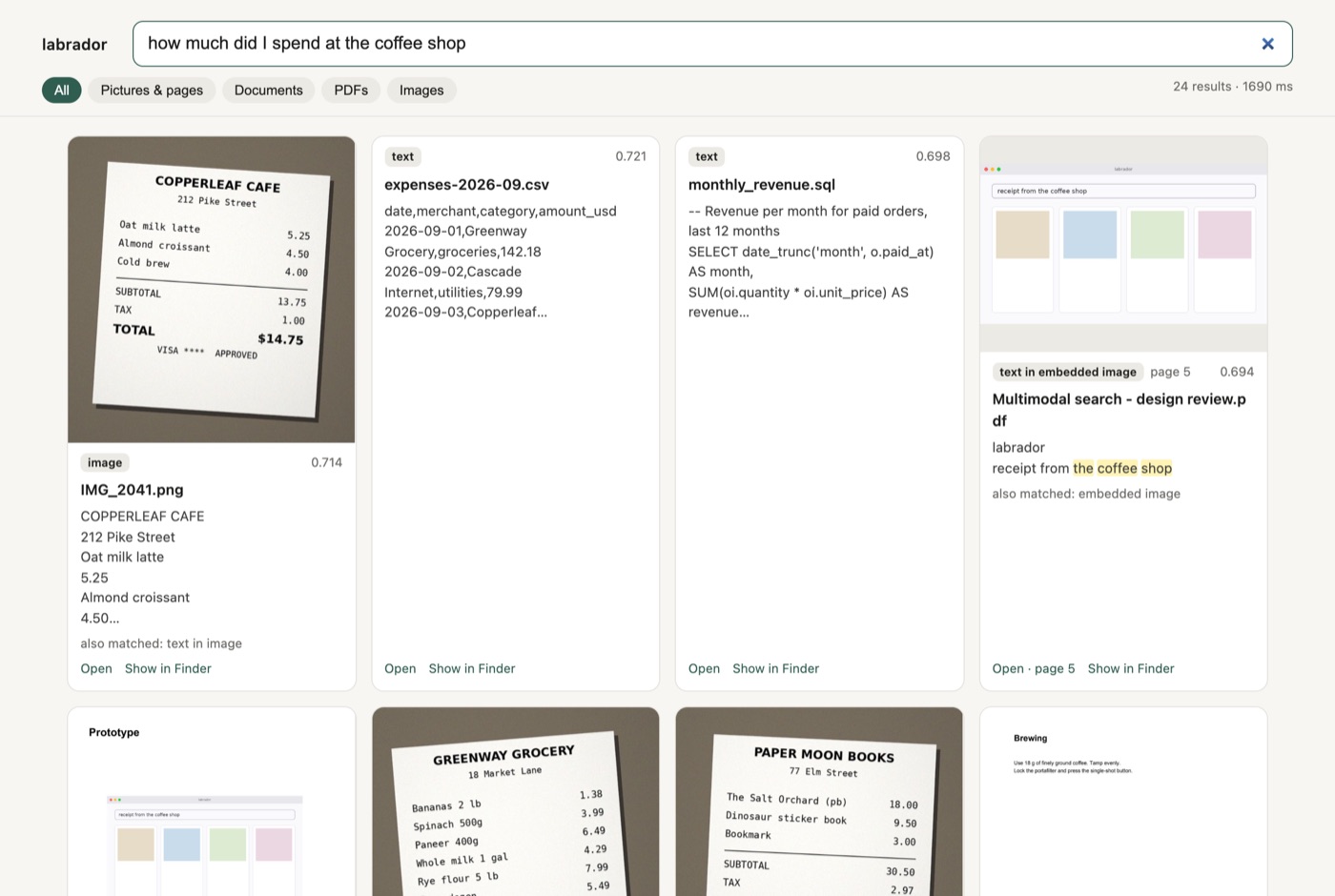
“How much did I spend at the coffee shop” returns the receipt photo first, with the text read off it (TOTAL $14.75) underneath. Second is the expenses CSV that has the same Copperleaf line. The query shares almost no words with either file.
The kinds of things it can match:
| Source | What becomes searchable |
|---|---|
.txt, .md, .html, .docx |
text chunks (1,600 characters, 200 overlap) |
| Images (PNG, JPEG, HEIC) | the picture itself, plus the text OCR reads from it |
| PDFs | page text, a rendered picture of each page, embedded pictures (and their OCR text), OCR for scanned pages |
| Word files | text, plus embedded pictures |
It also works across languages. An English query like “visit to the Meenakshi temple and the palace in Madurai” finds a travel note written entirely in Tamil. That comes for free from the embedding model.
The model: EmbeddingGemma 2
Everything rests on EmbeddingGemma 2, an open (Apache 2.0) embedding model from Google that puts text and images into the same vector space. A sentence and a photo of the thing the sentence describes land close to each other. That one property is what makes “describe it, find it” possible without captioning every image first.
It runs comfortably on an Apple Silicon Mac: about 1.5 GB to download, around 2 GB of RAM while indexing, on the MPS backend.
Architecture
The whole pipeline fits in one diagram:
folder ──► extractors ──────────────► units ──► EmbeddingGemma 2 ──► SQLite (vectors + FTS5)
            .txt/.md/.html/.docx  → text chunks                       │
            images                → picture + OCR text                 │
            PDF                   → page text, page picture,           │
                                    embedded pictures (+ OCR),         │
                                    OCR for scanned pages              │
query ──► EmbeddingGemma 2 (SearchQuery prompt) ──► cosine, per-modality z-score
                                                   + BM25 keywords ──► RRF ──► group ──► results
And the modules map one-to-one onto it:
| Module | Lines | Job |
|---|---|---|
extractors.py |
247 | turn files into units |
embedder.py |
141 | turn units and queries into vectors |
store.py |
173 | SQLite: vectors, metadata, FTS5 keyword index |
search.py |
123 | hybrid ranking |
indexer.py |
128 | walk the folder, skip unchanged files, drop deleted ones |
cli.py, web.py, watch.py |
~350 | the ways you talk to it |
Units and groups
The central idea is the unit: one unit is one vector. A text chunk is a unit. A photo is a unit. The OCR text read from that photo is a separate unit. A PDF page produces a picture unit for the rendered page, plus text units for its text.
Units also carry a group key. A photo and its OCR text share a group; a PDF page’s picture and its text chunks share a group. At search time, units from the same group collapse into one result. So when the receipt matches both as a picture and through its OCR text, you see one card that says “also matched: text in image” rather than two near-duplicates.
@dataclass
class Unit:
    kind: str                 # text | image | image_ocr | pdf_text | pdf_page | pdf_ocr | pdf_image | pdf_image_ocr
    modality: str             # "text" or "image" (which vector space region it came from)
    group: str                # result grouping key within the file
    text: str = ""
    image: Image.Image | None = None
    page: int | None = None   # 1-based PDF page
Adding a new file type means writing an extractor that yields units. Nothing downstream changes.
Embedding
embedder.py wraps the model with sentence-transformers. A few details turned out to matter:
- Documents and queries are formatted differently. Documents go in as
title: … | text: …; queries use the model’sSearchQueryprompt. The model was trained with that asymmetry, and skipping it costs quality. - Images go in as
{"image": PIL}with a per-call vision token budget: 280 tokens for ordinary images and 560 for PDF page renders, where the text is denser. More tokens see more detail and run slower. - float32 by default, bfloat16 optional, never float16. In float16 the model emits NaNs.
- The audio encoder is skipped. EmbeddingGemma 2 ships a ~300M-parameter audio tower. Loading with
config_kwargs={"audio_config": None}leaves it out. - Matryoshka dimensions. The model’s 768-d vectors can be truncated to 512, 256 or 128 and re-normalised (
truncate_dim). Smaller index, slightly lower quality. Part 2 measures how much.
A FakeEmbedder (deterministic hashing) stands in for the model in tests, so the plumbing can be tested without downloading anything.
Storage
No vector database. SQLite holds the units, their metadata and an FTS5 table for keyword search; the vectors sit in a numpy matrix and search is brute force. 100k vectors × 768 dims is about 300 MB and a few milliseconds per query on an M-series chip. A personal folder doesn’t need an approximate index.
Each indexed folder gets its own directory under ~/.labrador/indexes/<folder>-<hash>/ with index.db and a media/ folder of thumbnails. The source folder is only ever read.
Search
search.py is the most interesting 123 lines, so it’s worth walking through the steps.
1. Embed the query once, with the SearchQuery prompt.
2. Dense scores: cosine similarity against every unit. Vectors are L2-normalised, so that’s one matrix-vector product.
3. Per-modality calibration. Text-to-text cosines run systematically higher than text-to-image cosines. That’s the modality gap. Rank on raw cosine and a mediocre text chunk outranks a perfect photo. So each modality is z-scored against its own distribution for this query:
for m in ("text", "image"):
    mask = mods == m
    s = cos[mask]
    mu, sd = (s.mean(), s.std() + 1e-6) if n >= 8 else (gmu, gsd)
    z[mask] = (s - mu) / sd
A unit is ranked by how much it stands out among its peers, not by its absolute score.
4. Keyword scores. Embeddings are bad at exact strings: invoice numbers, error codes, confirmation codes. SQLite FTS5 with BM25 catches those. A unit only matches if it contains every query word. (That AND is the fix from part 2. It was OR at first, and that was the biggest source of error.)
5. Reciprocal Rank Fusion. The dense ranking and the keyword ranking are combined with RRF (k = 60): each list contributes 1 / (60 + rank). RRF only looks at ranks, so the two lists’ score scales never need to agree.
6. Group and diversify. Units collapse into their groups, and each file is capped at two results so one long PDF can’t fill the page.
The result for a PDF page shows the page thumbnail and the text from that page, whichever unit actually matched:
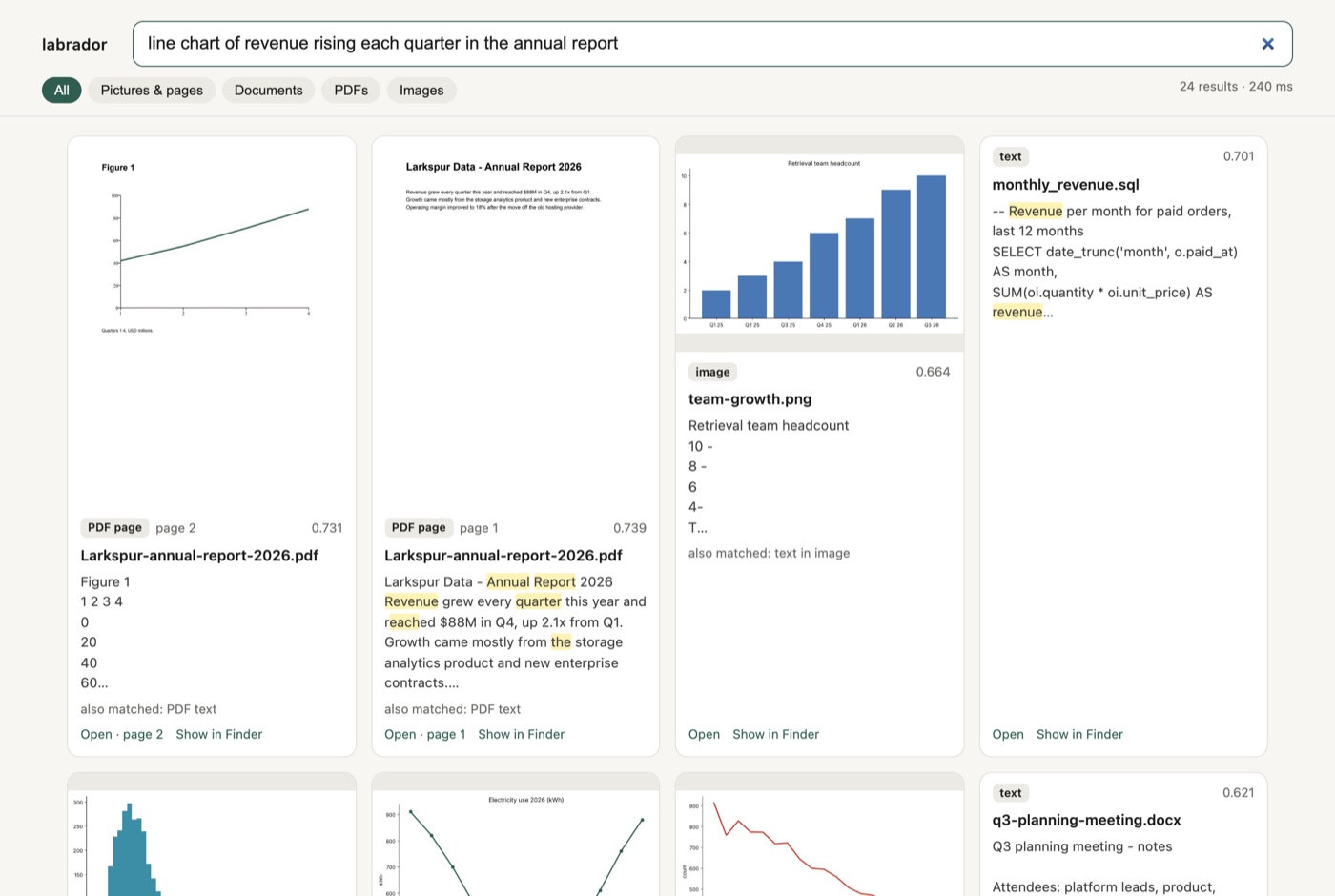
“Line chart of revenue rising each quarter in the annual report” finds page 2 of the report. That page has almost no text, only a vector chart and an axis label. The match comes from the rendered page picture.
Using it
Install
You need an Apple Silicon Mac (macOS 14+), about 4 GB of free RAM and uv.
git clone https://github.com/deepns/labrador && cd labrador
uv sync --extra mac --extra docs --extra sample   # torch, sentence-transformers, Apple Vision OCR, HEIC, docx

# Is the model healthy on this Mac? (MPS, no NaNs, sane text + image matches)
uv run python scripts/check_model.py
The first run downloads the model from Hugging Face. OCR uses Apple’s Vision framework, so it’s fast and needs no extra models.
Index and search
uv run python scripts/make_sample_folder.py ~/labrador-sample   # a small generated folder to try
uv run labrador index ~/labrador-sample
uv run labrador search "are dogs allowed in my apartment"
The CLI prints the kind of unit that matched, the file, the page, the raw cosine and which unit kinds contributed to the result:
 1. [pdf_text     ] pdfs/lease-maple-court-unit-4B.pdf  p.3   cos=0.730  via pdf_text,pdf_page
      3. Animals Cats and dogs under 40 pounds are permitted with a refundable deposit of $400 and monthly animal rent of $35. [...]
 2. [pdf_ocr      ] pdfs/scans/scan_0012.pdf  p.1   cos=0.650  via pdf_ocr,pdf_page
      Maple Court Apartments Lease Addendum - Unit 4B This addendum adds one reserved parking space, number 27, [...]
Re-running index only processes new or changed files, and files that disappeared drop out of the index.
All the commands
| Command | What it does |
|---|---|
labrador index <folder> [--rebuild] [--dim 256] [--image-tokens 560] [--no-ocr] |
First pass, then only new/changed files |
labrador search "<query>" [-k 10] [--only text\|image\|pdf\|visual] [--json] |
Search the last index |
labrador serve |
Web UI on http://127.0.0.1:8765 with thumbnails, filters, open-at-page, Show in Finder |
labrador watch <folder> |
Index, then re-index files 2 s after they stop changing |
labrador eval <file.jsonl> |
hit@1, hit@5, MRR@10 overall, per category and for hard negatives |
labrador stats |
Files and units by type |
labrador serve is what the screenshots in this post come from. It binds to localhost only and serves only files that are in the index. The filter chips (Pictures & pages, Documents, PDFs, Images) map to the --only flag.
Tuning knobs
| Knob | Default | When to change it |
|---|---|---|
--dim |
768 | 256 makes the index 3× smaller at no measurable cost on my benchmark (part 2) |
--image-tokens |
280 | 560 or 1120 for screenshots and detailed photos (slower) |
--page-image-tokens |
560 | 1120 for dense slides and forms; --no-page-images to skip page pictures |
--dtype bfloat16 |
float32 | halves memory; compare with check_model.py first |
A few design decisions
- The source folder is read-only. All writes go to the index directory. I didn’t want a search tool that could damage the thing it searches.
- The index knows which model built it. The embedder’s fingerprint (
model:dim) is stored in the index, and opening it with a different model or dimension is refused. Mixing vectors from two models in one index fails silently, so I made it fail loudly. - Everything is visible. No LangChain, no vector DB, no ORM. If you want to know why a result ranked where it did, the answer is in
search.py, and the CLI prints the raw cosine and the contributing units. - Plumbing tests run without the model.
--backend fakeswaps in the hashing embedder, so tests check the pipeline, not ranking quality. Quality needs the real model and a real benchmark, which is part 2.
What’s next
It works, and it feels good on my own files. But “feels good” isn’t a measurement. In part 2 I build a 120-file benchmark folder with 114 labelled queries, find out the keyword branch was quietly wrecking a quarter of the results, fix it, and walk through a set of everyday searches: receipts, boarding passes, scanned invoices, multilingual notes and a 40-page handbook.
The code is at github.com/deepns/labrador.


Comments